Observations
Best practices based rules, speeding up troubleshooting and debugging efforts.
Last updated Applies tortcstats.com
Data Structure & Analysis8 articles
The Observations is where the experience and know-how of the rtcStats team comes into play.
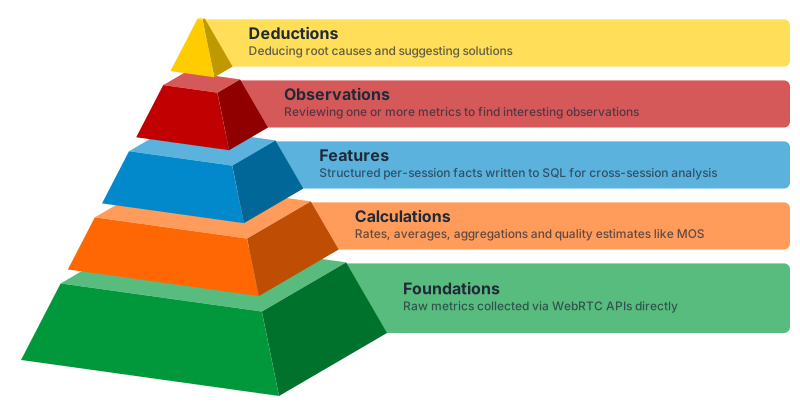
Observations are a set of interesting tidbits and information gleaned by looking at one or more metric values in the collected WebRTC data. Each Observation offers a view into something important that you need to know about the data.
With Observations, users can:
- Considerably reduce the time it takes to analyze issues in their files
- Focus on what is important in a session, deriving relevant insights that only WebRTC experts may notice
When a file is uploaded to rtcstats.com, it gets analyzed. Part of this analysis is the search for potential observations. When an observation is found, it is marked in the file. Each observation includes:
- Title and one-liner, indicating what the observation is about
- Severity, with a value of info, low, medium or high
- Associated tags, indicating the type of the observation
- Detailed description, found in the knowledge base
Observations may also have a timestamp and a value which are used by rtcstats.com to display it in the Logs view and offer a richer experience to our users.
A few things to know about Observations:
- Observations are produced by the rtcStats enrichment engine, available both on rtcstats.com and as an on-premise enterprise package. They are not part of the open-source rtcstats-js or rtcstats-server collection layer
- Observations are available only in commercial plans. The free accounts don't support observations
- We add observations to our service with every new release
- Observations are used in the calculation of the Experience score in rtcstats.com
Each Observation carries its own detailed explanation, and that explanation is read inside rtcstats.com: open an Observation on a session and its Knowledge Base entry opens next to it. To learn more about the underlying metrics an Observation is computed from, check out our WebRTC Metrics section in the knowledge base.
Was this page helpful?